In the ever changing world of generating Power Apps, CRM solutions, and Power Portals for customers, we often do not give a thought to the font being used. Microsoft does have a prescribed font though and it is part of a bigger design system called "Fluent".
What is the Microsoft Font Used in the Fluent Design System?
The Microsoft Fluent Design System employs a font called Segoe UI. It is pronounced like this: se-goe OR se-go-eh.
Microsoft has considered readability across various devices and platforms when choosing this font. If you are on an Android device and Segoe UI is not available on that device, then Android will use the native Roboto font. On a macOS/iOS device if the Segoe UI font is not available, then the native font used is San Francisco Pro Display.
What is a type ramp and what does it mean for fonts in Dynamics 365 CRM and Power Apps?
Now that we know Microsoft uses Segoe UI as the font, it is important to understand what a "type ramp", also known as a "type scale", is. A type ramp is a range of type sized related to each other by a growth ratio. It provides a standardized set of font sizes.
Lucky for us in Dynamics 365 CRM and Power Apps, we generally only see five (5) of these type sizes.
The five font sizes we see in Dynamics 365 CRM and Power Apps are:
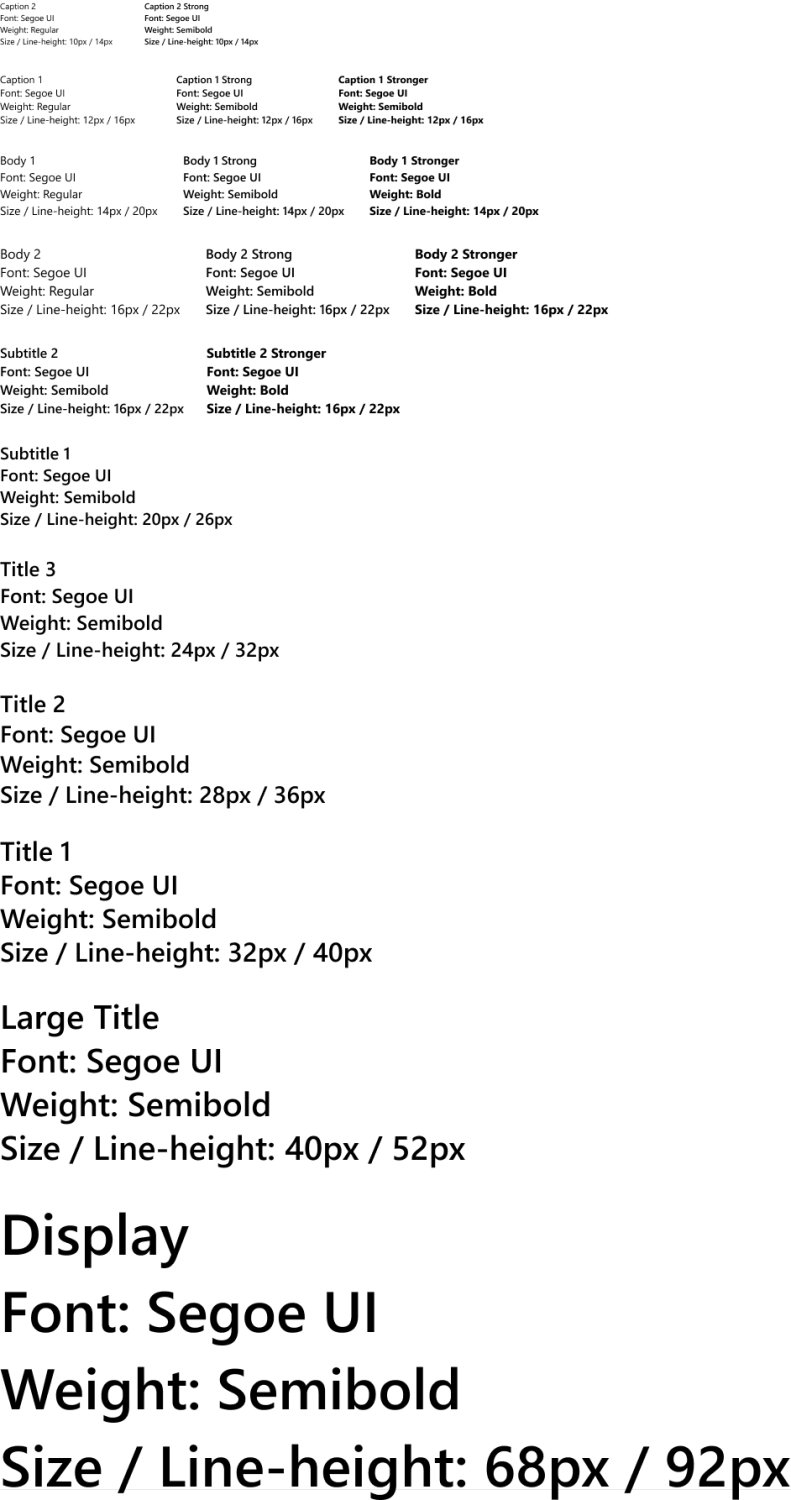
Form Header -- This is the oversized font we see at the top of forms in the header. For example, on the contact form it is the contact name. It is the primary field for a table. For this, Microsoft uses "Subtitle 1", which is Segoe UI, semibold, with a font size of 20px, and a line-height of 26px.
Tabs -- This is the font for the tabs you see on your form. They are "Body 2", which is Segoe UI, regular, with a font size of 16px, and a line-height of 22px.
Selected tabs -- This is the font you see for the selected tab on the form. They are "Body 2 strong", which is Segoe UI, semibold, with a font size of 16px, and a line-height of 22px.
Section headers and sitemap group names -- This is for the name you see on a section found on a form and it is also for the name of a group of entities grouped together on the sitemap. They are "Body 1 strong", which is Segoe UI, semibold, with a font size of 14px, and a line-height of 22px.
Everything else -- For everything else, you are looking at "Body 1", which is Segoe UI, regular, with a font size of 14px, and a line-height of 22px.
Here is an image I put together showing the type ramp
Happy software engineering.